I don’t have access to ClickUp. It’s been a loss of communication and transparency from my perspective. Is this the way it’s intended to work?
Danny,
Yes. Please check my earlier message about accounts costing money. It’s a backend and you’re not missing much without the direct access.
Slack emojis in the problem report channel help orchestrate and close things out
Quick question about ClickUp, is each piece of equipment its own task, or are repairs logged as separate tasks each time something breaks?
I have a list entirely devoted to Asset tracking.
The nice thing about clickup is I can share this list publicly with interested folks and volunteers without requiring everyone to have an account.
It’s the interaction piece that either requires an account or needs to have some hook-ups (i.e. slack reactions)
To finish answering your question, each problem report is a separate line item in the problem report list ( Problem Reports Grouped by Workspace, Michael’s better view) and they are logged individually for each problem report form submitted. As of today they are not technically linked together.
Some other context for background:
In a fully baked CMMS (Computerized Maintenance Management System), there would be an extremely thorough list of logs, reports, and work completed logged directly against the asset. Fully baked CMMS tools also require user accounts and users to regularly keep up with the data work, otherwise things become ugly and not useful kinda quickly.
ClickUp would need some customizations and code to link problem reports to assets at this time, at least until they get this feature worked out natively.
ClickUp is allowing us to collect a TON of data though and it can be exported at any time. It’s kinda fun to put it all through a Claude tool and prompt for it to analyze trends and patterns. I posted a report on Discourse a while back and likely overdue for one now that we’re in June. Stay tuned on that front.
From a little bit of googling and comparing Airtable to ClickUp, I think there’s a few ways to streamline this in ClickUp, (create an equipment dashboard that shows machine status, and make it more accessible to members thru a guest link that lives on the wiki or website). Admittedly, I’m not a tech person and might be way off, but I’d be happy to do more research and report back if that’s helpful? Don’t want to add to anyone’s workload and I realize a lot of work has already been done, so no worries if not
ETA: this might require creating seperate QR codes for each piece of equipment that offers both problem reporting and closing out tickets when they’ve been repaired.
Unfortunately, Dashboards (while very cool in ClickUp) are one of the things that can’t be publicly shared today.
My grand scheme when getting this all going was for an asset to be marked by a status, then at the minimum share a list (like this one) showing which tools are red tagged or yellow tagged.
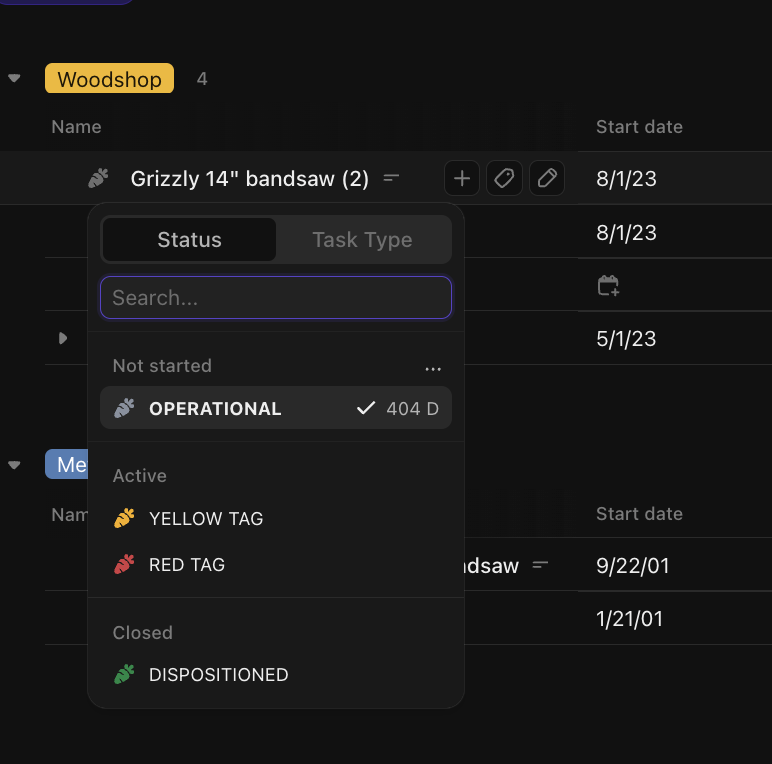
But I never finished pursuing this. A mixture of busyness, but also not sure how to make sure it is reliable. It’s great if you can see a tool is red tagged from home on this list, but it’s not great if a problem report lingers and doesn’t get closed out and doesn’t update the tagged status.
Just wanted to chime in and say that IT Volunteer Days happen monthly and are on the events calendar with all other volunteer days. No need to sign up. Just show up ready to work!
The next one is June 14th from 2-430PM.
5 Likes
Can you tell us what planned work is?
@rjnevels @flowmage @YellowEng may know
Our next planned topics are around configuring the central PC and writing more unit tests for NeonIntegrations. But we’re always available to follow the interest and needs of anyone who would like to show up and help!
Based on this thread, we’ve got this slated to discuss at the volunteer time next weekend. Post coming soon! If you have ideas about things to automate or report on, tool ideas, anything!
digital signage in each shop showing both general info for all members and info specific to the respective shop. That info could include the current per-tool view of tickets, rotating through.
I especially like this idea. I have talked about 2 other use cases for digital signage - Showing live bookings (helps remind folks that they must book things, and remind each other), and showing the live air quality readings (we have a lot of sensors actually!).
I think we should talk about sourcing the displays and some kind of computer to drive them! Cost effectiveness and reliability are key.
Cheap tablets displaying a fixed web page in “kiosk” mode might be a good idea.
1 Like
There are SAAS options that use an app on a smart TV.
That approach would certainly be inexpensive. Put them near entries, where everyone would pass by?
What I like about full size TVs is that people might just pause at their work tables and stare at them from time to time. I think that works be the best solution, though not the only solution.
If someone with access doesn’t mind a couple of the metal shop tickets can be closed: the acetone dispenser is currently full (and has been filled several times since I opened that ticket) and the one about a burned off ground clamp is from before the ground clamps were replaced. Both welders currently have working clamps
Bravo Ryan for requesting ticket closure!!
There’s a lot of great insight here on our current problem report system. The IT Committee would be delighted to explore this in more depth!
1 Like
I found the reports and checked them off. Thanks!
Maybe we need a ‘report working’ ability too? 
I’m going to be in the shop later this afternoon. One thing I want to take note of is some of the long-term yellow tags on some tools. If there are any that are not matched by a PR/ticket, I’ll go ahead and enter a PR/ticket.
I look forward to discussing this in the IT team meeting on 6/14. I think this group can help with some of the solution.
I’ll be there on 6/14 but have to leave early for the CNC class, I’m also not a tech person so may not have much to contribute but hope to learn more about the current processes