I’ve done a few Problem Reports, and I can’t tell what happens to them afterward. Does the fix, or the inspection, or the it’s-not-really-a-problem note get entered onto the ticket and closed? Can I access the ticket list and see if a problem with a tool has been resolved?
Yes! They’re trackable as described here: Problem Report Tracker (direct link without discussion: ClickUp ). If you opt to create a Discourse post when you file the report, it will also be updated as the status changes. That can be very helpful to alert the community that there’s a problem and spur discussion about possible solutions.
1 Like
probably a good time for shop leads to review open problem reports in their respective areas. seeing that there were 190 open reports, I just filtered for Ceramics and was able to clear 15 going back as far as Summer 2025.
2 Likes
Is there a feature that lets you create a filtered view? I haven’t found one, so I keep just searching for the string 3D, which has some false positives
Thanks, Aneel.
When I look at the kanban view on ClickUp, I see 176 open tickets, many of them from 2025. It seems that something is amiss. I’d bet almost all of these problems are solved, but not noted as solved.
I think it’s difficult to keep up with all the reports that are generated.
If the bandsaw blade broke for example, a report may be generated, but someone who knows how to replace it may install a new one but may not necessary lookup to see clear any pre-existing problem report. IMO, it’s not very easy to look these up today. There may also be multiple reports generated for the same problem.
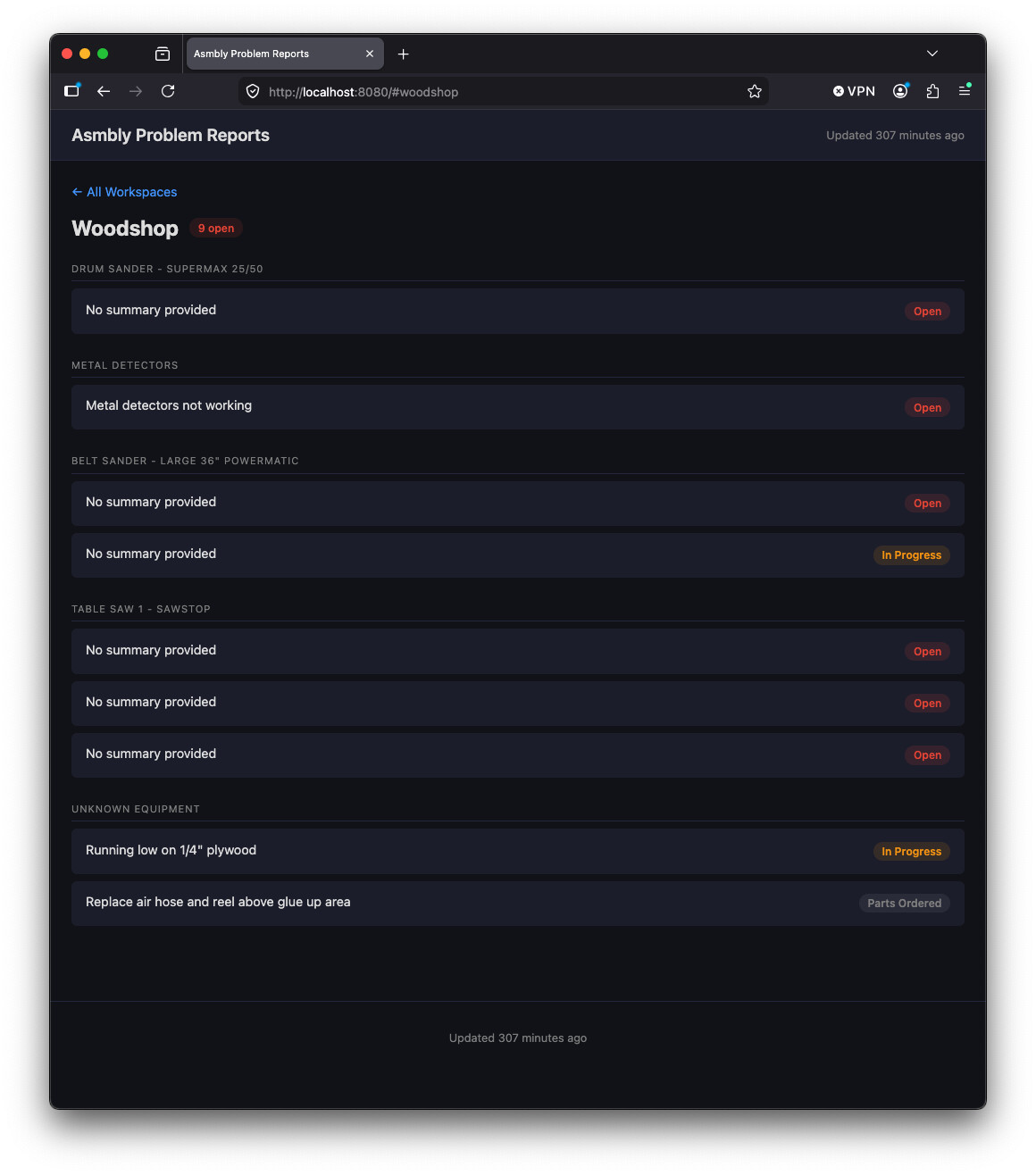
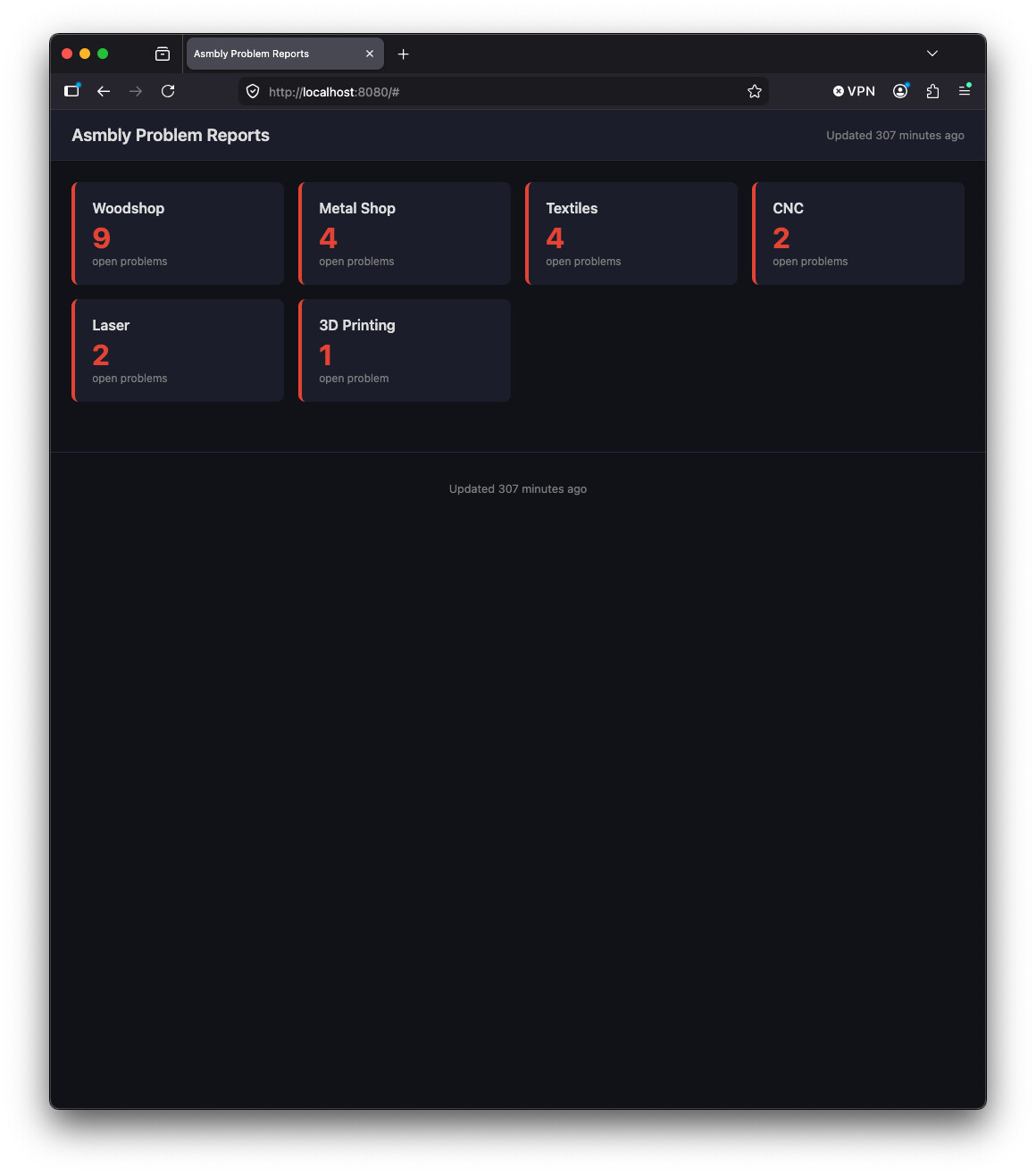
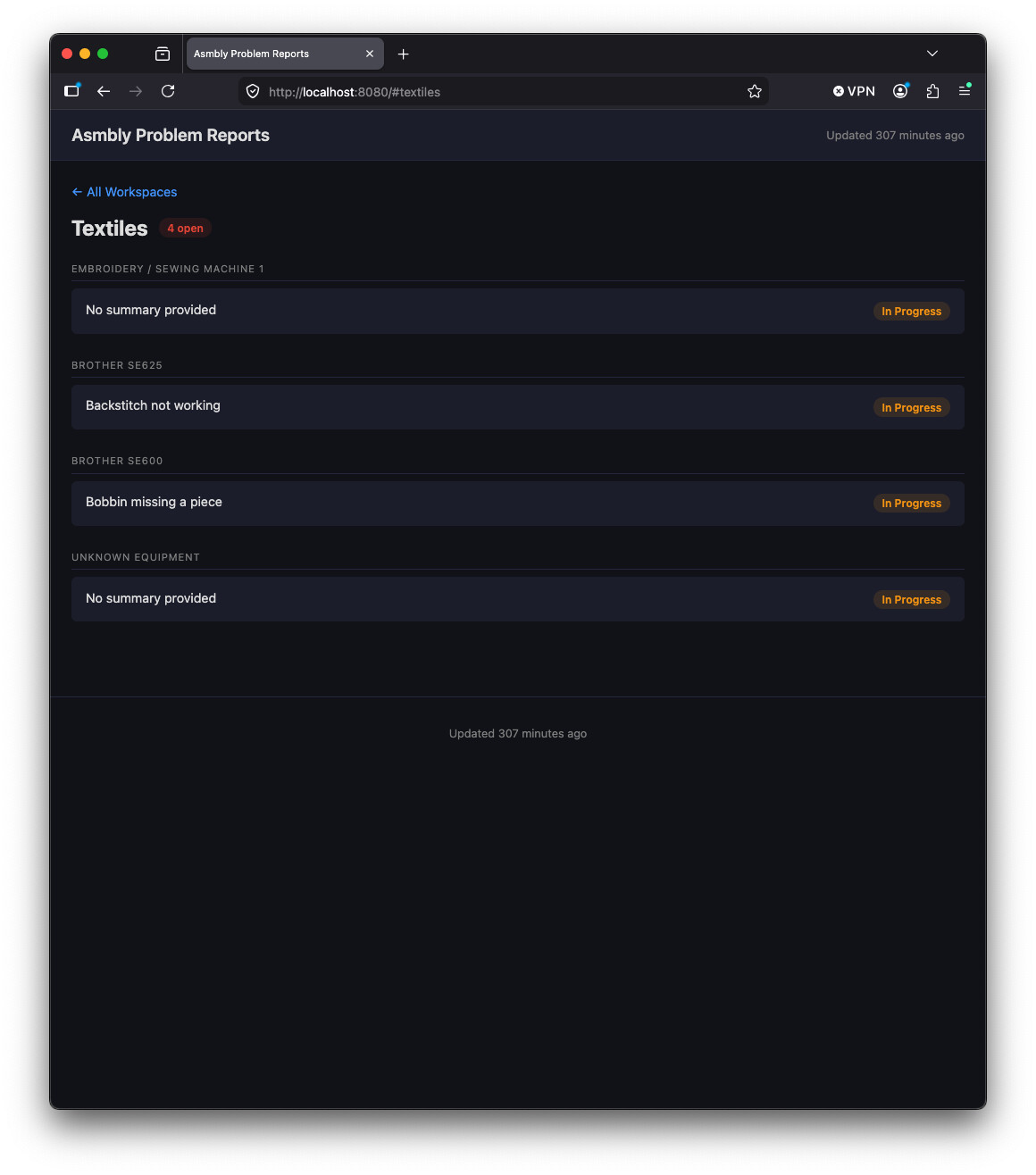
For the woodshop in particular, it would be nice to have some kind of per-tool view, on a public facing website. This would make it easier to see what is red/yellow tagged before you plan your work and make a trip to Asmbly. On the steward/leads/volunteer side, it might make it easier to digest and clear old reports, as well as see some kind of history of current/old problems with the tool.
It also seems like there should be some better bug reporting tools we could use on the backend to handle these reports as well. I’m not suggesting change the google form, just changing where the data goes.
Just some thoughts…
2 Likes
Al, you make a great point about the per-tool view. Before leaving home, one could determine if the necessary tools are in working order and decide whether it is worth the trip.
As for there being so many tickets, that perhaps be remedied by a shared determination to look close tickets as appropriate, especially those that have gotten really old. One way of closing a ticket, for example, is to note that the tool was inspected and no problem found.
Clickup is soooo much better (thanks @Rolo !) than what we had before (backscroll in slack  ), but yeah, there’s definitely room for improvement. Maybe the IT team would be excited about some volunteers to work on that specifically.
1 Like
We’re in the planning stages of forming a Membership Experience Committee to get a better idea of the barriers members may face accessing Asmbly services. We hope to identify friction points like this one and also provide actionable solutions in coordination with other committees and facility operations. If anyone wants to be on the committee DM me please
1 Like
ClickUp has an API and an MCP server so someone could make a GitHub Page that lists the issues broken up by Area and machine.
Unfortunately I don’t have access to the workspace so I can’t populate that data. If someone wants to add my ClickUp account to the workspace or take over that GitHub project please do. My ClickUp account is under my gmail address.
1 Like
That’s probably an @Rolo ask
I think the solution will be partly improvements to the IT, but the larger part is having more complete data. With partial data, APIs, aggregation per tool, and dashboards won’t be accurate. Perhaps the best place to start is with the ticket data itself.
Note that at this moment in ClickUp, there are
178 open tickets
9 in progress
3 parts ordered
1 completed
22 closed.
@aneel I remember vividly being able to filter at one point-- perhaps with a link @Rolo provided in the past? I recall there being a push to clear out old reports and maybe a specific link was provided or a view or something. I ended up running a search for keyword “Ceramics” in channel “Problem-Report” on Slack. Definitely not perfect but it was workable for me-- 3D Printing might not be manageable with that method.
@brucehermes It’s worth noting that there must be some sort of roll-off period for reports because I have personally closed well over 22 problem reports in the last 6 months alone. I am not sure the parameters-- but I can assure everyone that leads/stewards/volunteers have closed far more problem reports than what is currently reflected.
@smartin I fully believe that some large number of tickets must roll off after completing or closing. What I am mostly focused on is the number of open tickets. I suspect that a large number of those have been dealt with, but not noted as such. So if anyone tries to aggregate data, it may look like every tool in the shop is broken because of open tickets that have in fact been resolved.
1 Like
You can definitely search in Clickup, but a search for “3D” finds things that mention “3D”, like woodshop tickets complaining that a 3D Printed adapter for a woodshop tool is broken. What’s worse: if you click a link from your search, and then click the back button in the browser, you have to search again.
Since the tickets are generated from a google form there’s a couple of fixed strings you can use to search more reliably.
Workspace: 3D Printing
Workspace: Woodshop
Workspace: Metal Shop
Workspace: Lasers
Workspace: Ceramics
Using 2 spaces is important, except for the problem type field which only seems to have one.
It’s my dream come true to see folks engaged in this problem report board!
@atwatsoniii hit it right on about how it is used. I would love for some help making this better for folks and happy to get you some access @Iammikecohen. I’ll send you some notes about how it is organized in case that helps put a better view together.
Here’s another view that might be useful in the meantime.
Problem Reports Grouped by Workspace
Aside on ClickUp. It’s very powerful and has a lot of room for customization. It offers public views for many of the data views. Clickup is acting as a “backend” for problem reports, purchase requests, assets, vendors, used for ceramics, and a few other things. It was brought in to solve more than one problem: When a problem report is made, it alerts staff and volunteers on Slack and that was it. We added the “report to discourse” button to add visibility for more public facing things. But that still meant reports are logged in multiple places without concrete resolution paths. It’s setup today so that if a volunteer closes a report and marks it in the Slack thread, it will close it on Discourse and ClickUp. An attempt to close the loop, although it’s only one way to close the loop today. I’d like for this to be a much easier path such as seeing reports at a tool, seeing the report and saying “Hey that was fixed” and much more easily close it out.
The Problem Report form itself, I’ve been wanting to revamp the form from Google to ClickUp and include the actual assets list, however that isn’t supported for public forms yet.
Like @Anneel mentioned, you can use the search box to filter things down a bit.
Users in ClickUp cost about $28 a month right now, so the actual user base is pretty slim. Guest accounts (non-Asmbly email addresses) are free and I believe we have room for 10 or 15.
2 Likes
Thank you, @Rolo . I wonder if the linkage from Slack is not working to close the tickets in Clickup? The view you linked us to–the Problem Reports Grouped…” shows around 100 open tickets in Woodshop alone.
In my ideal world, from a member POV, I could login before coming (20+ mile drive) and see a list of the major tools in the woodshop and see a thumbs-up or thumbs-down next to each.
A couple of days ago I drove in and discovered the planer in disrepair, and it was at the front of my planned workflow for the day. And although Michael D. had showed me a few weeks ago how to adjust the rollers, I found the adjuster screws and setscrew apparently stripped, so I couldn’t adjust it myself. So now I really want to know what’s broken before I come in.
1 Like
The linkage from Slack works. The crux of the problem is that sometimes a volunteer will fix a problem and not update the status in Slack. The volunteer may not even notice there is an open problem report that they’re fixing. They just see something broken and fix it.
For example, there’s currently an open PR in 3D Printing about Athena that I ordered a part for last week, but neglected to update (I’ll do that now).
1 Like