Data nerd alert: I like graphs. I also have allergies, so I like graphs that can tell me when it’s allergies, and not COVID.
(I was reminded of this draft after chatting with James about it briefly at the social hour tonight. I will also bring it up at the Home Tinkering SIG later this month to gauge interest.)
I run an open source air quality monitor in my home office. I have it set up to blink one of my lights at me when CO2 gets above a certain level, so I can turn on my ceiling fan. Originally, I got it with a VOC detecting accessory so I could sit it directly on top of my 3D printer for weeks as I ran it to determine if I needed to invest more time in a filtering solution. (Spoilers: for PLA and PETG, not really necessary for these contaminants.)
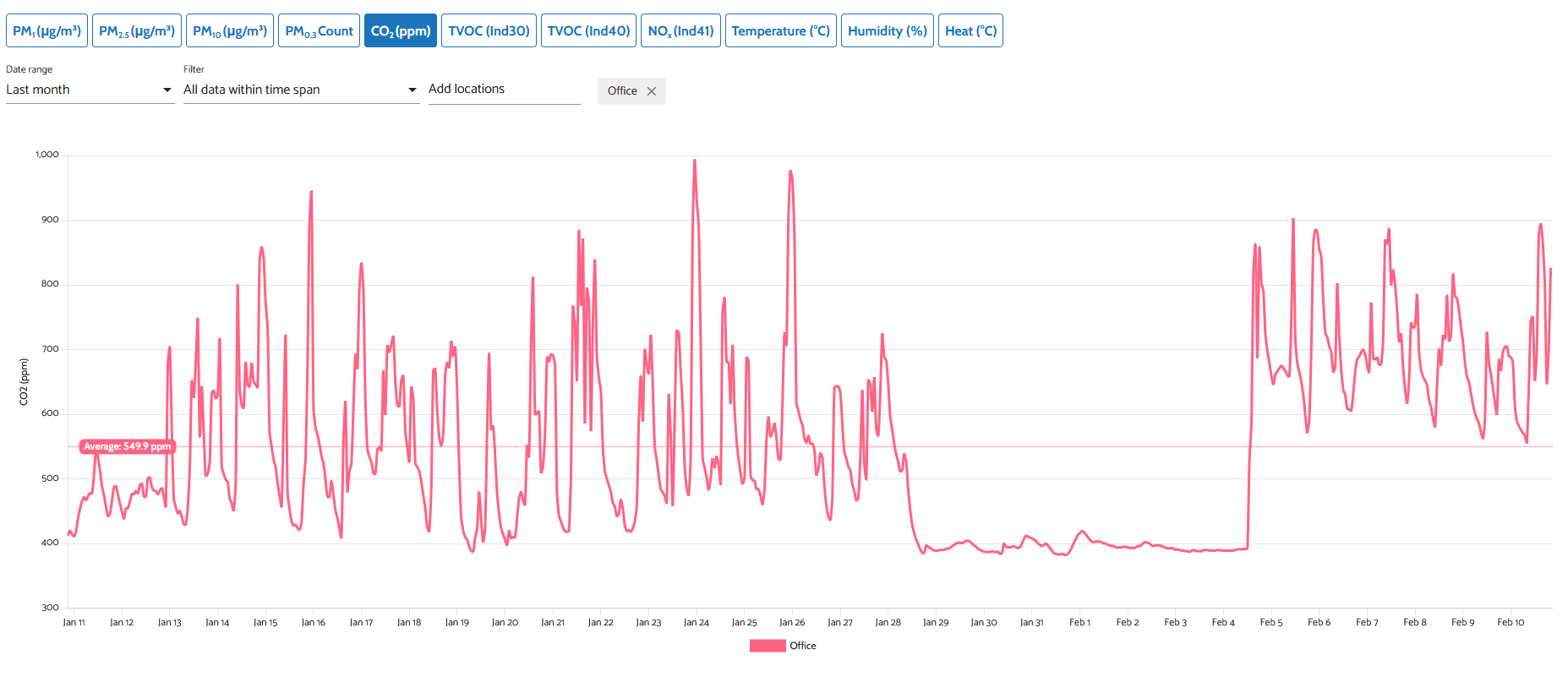
Take a look at the CO2 levels for a month in my office. Can you tell when I went on vacation for a week?
I think it would be very interesting to see how air quality is doing in different areas of the shop. We can all smell some wood dust and laser smoke when we enter the respective areas, and we can see when dust is piling up. It’s less clear if the particulate is at a concerning level, is ‘leaking’ from one shop area to another, or if the smell will be as clear a clue in the ceramics area, from the 3D printers, or what air quality concerns there are in the metal shop or electronics lab.
The proposal:
Purchase and install approximately 5 indoor air quality monitors from AirGradient, at a cost of $138(kit) or $195(assembled) per monitor. This is one each for the Laser, 3D printer, wood, metal, and ceramics shops. Additional monitors for the lobby, electronics, textiles could be considered.
Add the public widget for air quality monitoring to one of our public or member-authenticated sites. (see here)
Benefits:
Clear moment-to-moment safety indication to members who may want to mask up. (I tend to wear my respirator in the wood shop the whole time, my allergies thank me.)
Data driven filter replacement, HVAC configuration, and alerting. I know we have a filter maintenance schedule, and we try to maximize life as much as possible. This could let us slightly stretch - or more likely trigger early replacements - both of which could have a budget impact. (Doubtful it would pay for itself to be honest.)
Cool factor! These are Home Assistant capable if we want to hook them up to ventilation, LED indicators, etc.
Risks and Mitigating Factors:
The biggest risk I see is … ‘meh’. In a couple years when sensors need replacing (they do have a lifespan) will we have seen enough value to justify keeping it up? Would anyone look at this data more often than once? Would it be useful to staff for troubleshooting HVAC? I don’t know - so please let me know in this post if you do or don’t care!
Repair/replacement. The ‘kit’ version does not come with a warranty, so having a spare would be best. AirGradient has a strong commitment to right-to-repair, and replacement parts are available in their store. However, they are a young company. My specific monitor is no longer available, and their model lineup has shifted over time. We should be prepared to source sensors from other locations as well.
Other options:
Cheaper monitors are available from IKEA. They are not very well reviewed. They don’t tend to be as accurate, don’t use repairable components, and the data system is not likely to be able to support our user count. I’m always in favor of a hack though!
More expensive ‘pro’ monitors are available. I can’t see spending more than this unless some other key benefits are present.
There are likely some other open source projects available that I haven’t found!
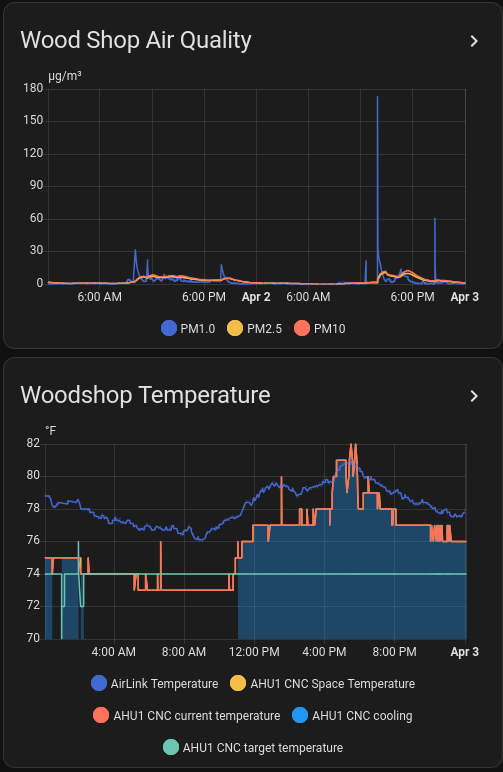
We’re currently using Davis AirLinks for indoor air quality monitoring in the dusty areas (ceramics, wood shop, and lasers). Those only measure particulates; the AirGradient sensors also support VOC, CO2 and NOx measurement which might be interesting, especially in the less-dusty areas.
We’re using Home Assistant for logging and visualization but we could stand to do a lot more on that front. Would you be interested in helping out on the analysis and presentation front first?
I love graphs too and I like everything about the AirGradient air quality monitor. This project also ties in nicely with the new Home Tinkering (home automation) SIG. Count me in. I’ve got one kit ordered which will probably live in my van. Thanks for the heads up.
Excellent to know we have some particulate monitoring already! And that we already use Home Assistant to log the information. I am not an expert at connecting HA data to things, but I am interested in learning and contributing. I’ll plan to bring the monitor and my dashboard to the SIG and we can strategize about what’s needed.
For the analysis and presentation… the sky’s the limit. Aside from looking at the graphs, what is useful to people? A green/yellow/red of particulate? Actual numbers, and a scale to read them?
I very briefly looked in to making public Home Assistant dashboards for the 3D Printing space (there are internal ones already), before realizing that HA still doesn’t have any kind of granular access control.
It’s not that hard to have HA export all of its data to Influx and use that as a backend for Grafana to make arbitrary visualizations, if someone were excited about that project.
As I’m skimming through the forum, your post has me coming full stop. Is there really a SIG for Home Tinkering/Automation?!? If so, where is it on the scheudle because I would be attending every month!!!
Home Assistant has been promising real role-based access control for as long as I’ve been using it. Last time I checked it was still on the roadmap for soonish, so I’ve been waiting with crossed fingers instead of coming up with something bespoke.
Seems all the contributors are distracted with AI features at the moment, but I haven’t given up hope.
A couple of people had done some more comprehensive measurements for a while about two years ago. One result was a big spike in both VOCs and particulates when people were welding. That was why we made welding ventilation a big focus in the new metal shop. It would be interesting to see similar measurements now.
I would like to be able to see real time levels on air quality metrics. I wear my filtration mask when I am personally sanding or doing other significant dust creating work. But I confess to taking off the mask when working at a table. It would help me to learn more about my own allergy and asthma trigger levels to have access to the data. I support expanding the monitoring at least for the short term so that we.can determine what kind of risk levels are present and give consideration to remediation. I like hard data for making those decisions.
Well, this is certainly more interest than I thought I’d get. Plus, it seems we have some data already! All great news.
It seems like data collection is just one part of this, and a part that we have some progress in already. The dissemination of that data is the more difficult part, and also the part with more interest.
I want to discuss this at the Home Tinkering SIG for sure, but perhaps this proposal goes farther than needed in showing the data publicly/online. I assume that stewards and such can get access to the data via HomeAssistant by request. So additional data collection may help you, but the presentation may not.
For general members, how would your needs be met by these scenarios?
What if:
While on ASMBLY WiFi, you can scan a QR code URL to view an air quality dashboard. RBAC is less of an issue here as it’s network isolated.
Each AQ monitor was accompanied by a wall-mounted monitor showing data from that station. (Think Raspberry Pi + a used discount LCD screen.)
Each AQ monitor is accompanied by a RGB LED showing some health threshold on the data from that station. Similar to the main dust collector’s big red bulb. (TBD: color-blind accessibility?)
My home assistant app (or other open source) can be set up to show data from ASMBLY before I decide to come in to the shop! (This is going to need way more auth setup.)
Personally, I think a local display would be enough for my needs. I would most prefer option 2 here, as I would not often remember to check AQI unless I was feeling a problem. So it doesn’t help me prevent allergies/asthma. My schedule is what it is, and I’m unlikely to avoid a shop when I have time and energy to be there - but I would like to mask up!
I prefer a display over an indicator light (option 3) so that I can calibrate my own sensitivity threshold better.
I’ve come across a new sensor option, called Polverine. Polverine
$62.41 per board currently, including firmware that will talk to Home Assistant over MQTT. Would also require some power supplies, and a printed enclosure!
I have updates and cool things to share about air quality in the shop. Let’s start with the ‘done’ side:
The 3D printer enclosure now contains the resin printers! This was a big effort by all the 3D printing volunteers, driven by some air quality data about VOCs released during printing, and even more so during post processing.
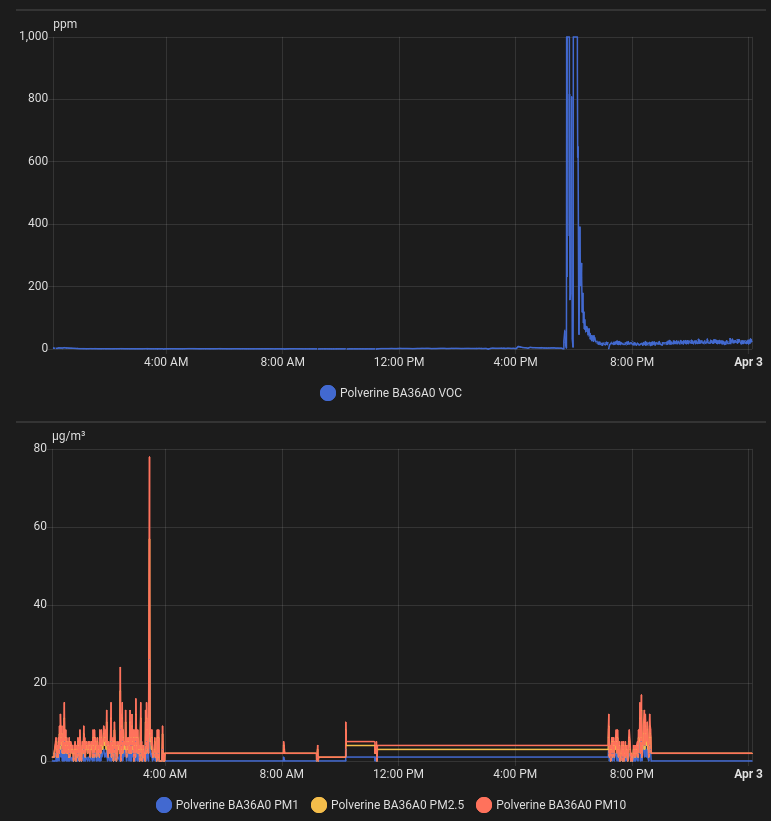
Aneel has built (and is still tuning) a carbon filtered vent, fan speed controller, and air quality detector using the Polverine (new link) and the nice newest Bosch air quality sensors included. This already has data flowing in Home Assistant!
We have four total Davis Airlink devices in the woodshop, laser room, ceramics area and the kiln room. These are solid accuracy and quality for the critical areas where they’re deployed. But they’re also much more expensive than the DIY options, so not adding them all over the place makes sense.
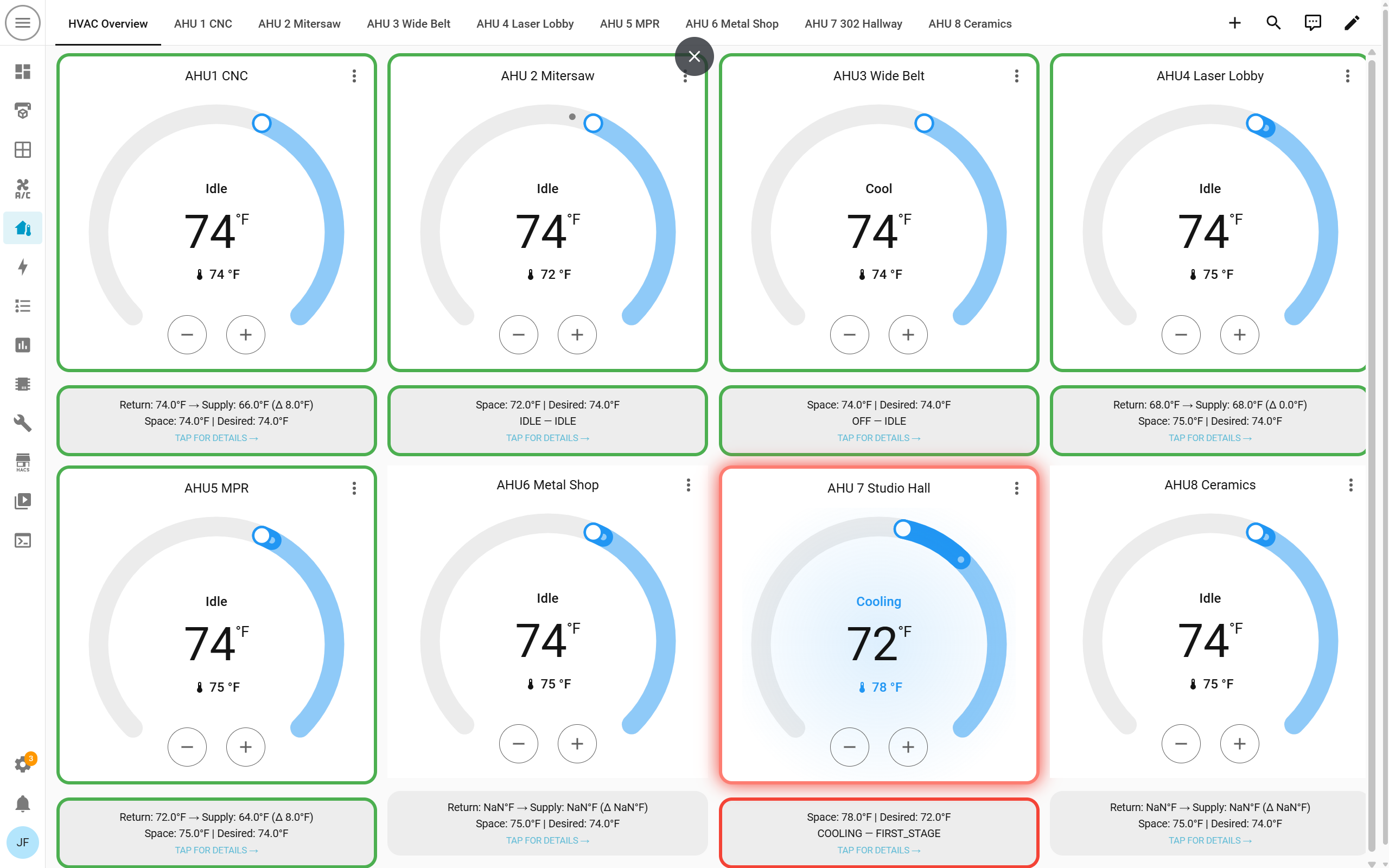
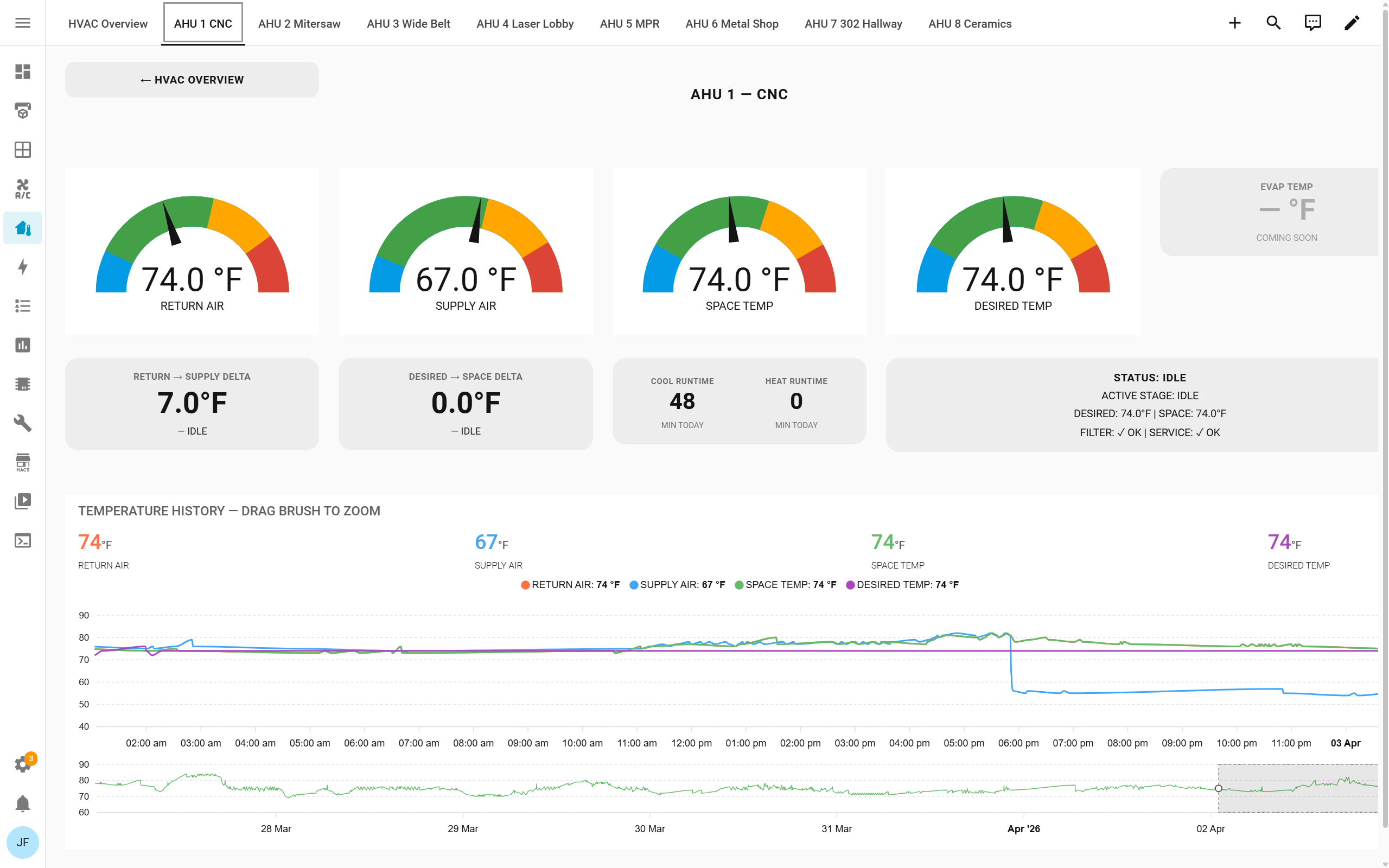
James has done a bunch of work to get all the HVAC controls and thermostats hooked up to Home Assistant as well - so we can track A/C activation and temperature too.
Together, that gives us lots of data in Home Assistant to play with:
So what’s left? TONS! Here are a few ideas to move forward with:
Can we monitor much more cheaply somehow? What if we could sense particulate and/or pressure both before and after the air cleaners for filter change detection? We could get together and bulk build something ESP32-ish to deploy around the shop. Any guidance on sourcing boards, sensors, or a full BOM if available is welcome!
Let’s display this stuff! With some displays in the space, we could display current sensor readings and air quality guidance. We’d need a source of cheap-ish displays, plus some controller that can render a web page to HDMI - maybe a Raspberry Pi, but could we go smaller? Or should we go bigger with cheap larger TVs and also display the Skedda space bookings alongside the sensors? Ideas very welcome - what do you want to see?
Ideas and design philosophy for what we could do automation wise are very welcome. Some examples are easy to think of - Aneel plans to run the carbon filter fan only when VOCs are high. We could run the Tarkin laser exhaust fan when laser room particulate is high. Others are not as easy: can we extend filter life by only running the Blue Ox air cleaner when needed? If you can think of a way to sense something and switch something, we can definitely automate it!
My contributions were inspired by the work done previously, and a hot day in the shop while teaching. There are a few more sensors to install, and more fault logic to explain but it gives a fairly quick health check. Here’s a current view of the AC overview:
This is soooo bloody cool! Thanks to everyone who has, and will contribute to this project going forward.
One area I’m particularly interested in is the AC’s in the wood-shop. The new DC kicks out an incredible amount of heat and I’m interested to see how they can keep up with the demand. What if any additional maintenance and an increase in filter changes will required.
@flowmage great use of the word necromancy! That gave me a nice chuckle
I got to see the the early first hand look the HVAC monitoring system. It already helped identify an issue before a water leak started happening. There’s a lot to this and I’m excited to see it in motion.
As well as all of the things that you’re speaking about, Evan!
Y’all are breaking into facilities automation type software. I’ve never found any solutions at any sort of reasonable cost or barrier of injury for a place of our scale which makes what y’all are doing even more impressive and valuable for us.
I have a few things to ask of y’all while you’re working through this.
When something is set up, have some good documentation and troubleshooting steps in case someone not familiar with the setup, operation, and integration needs to work on it someday. One specific document that comes to mind is something that shows where all of the sensors are plugged in. These kinds of things are helpful when Sarah and I are walking around troubleshooting facilities things.
Or any data that goes public on a TV, make sure it is right. We don’t want to freak people out with some wild readings unless it is actually true.
If there are any big changes to any of the HVACs, or blue ox’s, please keep us informed.
I’m all in favor of using sensors to help control the equipment.
At the end of the day, I’m super pumped about it. All. Please just keep us informed as progress goes and let me know how I can best support you from the facility side



 The 3D printer enclosure now contains the resin printers! This was a big effort by all the 3D printing volunteers, driven by some air quality data about VOCs released during printing, and even more so during post processing.
 Aneel has built (and is still tuning) a carbon filtered vent, fan speed controller, and air quality detector using the


 We have four total Davis Airlink devices in the woodshop, laser room, ceramics area and the kiln room. These are solid accuracy and quality for the critical areas where they’re deployed. But they’re also much more expensive than the DIY options, so not adding them all over the place makes sense.

 James has done a bunch of work to get all the HVAC controls and thermostats hooked up to Home Assistant as well - so we can track A/C activation and temperature too.