Re: Yes, I have loosened and aligned before. Can you tell me when you were able to do that? And if you are interested you are very welcome to help. I have scheduled time tomorrow (Tuesday) from 6-9 PM to resquare and reverify it.
In the past James measures the puck in the metal shop (more accurate), and then we can set it in the large Laguna controller setting. I have yet to query James again to check if he made it back to Austin (he was traveling) and that he can be there tomorrow / Tuesday, I will give him a little more time before I check in with him.
I adjusted it a bit last night and about a year and a half ago. I would still go ahead do your full planned process. ( I am not available till Friday )
Any half decent set of calipers is fine to measure the puck. I have found that is off about .1-.2mm from whatever the actual caliper or micrometer measurement is(the best process is to get it rough and adjust it by actually bringing a bit down to zero and adjusting the value in the control is so it is actually on the spoil board. The spoil board is in pretty rough shape so not the best time to do it but will be better than it is currently.
Laguna Tools does not specify an exact, numeric torque value in the Swift Series Owner’s Manual for the Y-carriage or gantry-to-carriage structural bolts. Instead, technical support and industrial standards dictate tightening these critical structural bolts firmly by hand until fully snug, plus a quarter-to-half turn, while ensuring the assembly remains square and does not bind. [1, 2, 3]
If you prefer using a torque wrench to ensure even clamping force across the carriage, you should follow standard engineering torque specifications based on the specific bolt size and grade.
Standard Metric Bolt Torque Estimates
The Laguna Swift typically utilizes high-tensile metric socket head cap screws (typically Grade 12.9 or 10.9) to secure structural components to the linear bearing blocks and drive assemblies. Use the following guide if you are tightening into steel/iron threads:
M5 Bolts: ~5.5 to 6.5 ft-lbs (7.5 to 9 Nm)
M6 Bolts: ~9.5 to 11.5 ft-lbs (13 to 15.5 Nm)
M8 Bolts: ~23 to 27 ft-lbs (31 to 37 Nm)
M10 Bolts: ~45 to 53 ft-lbs (61 to 72 Nm)
Laguna Swift diagonal square test tolerance
The acceptable diagonal squareness tolerance for a Laguna Swift CNC Router typically falls between 1/32 inch (0.03125") and 1/16 inch (0.0625") across a standard 4x4 or 4x8 foot work envelope. For high-precision cabinet nesting and interlocking joinery, operators generally target a stricter tolerance of under 1/32 inch, while general woodworking can tolerate up to 1/16 inch before visible alignment errors manifest in completed projects. [1, 2]
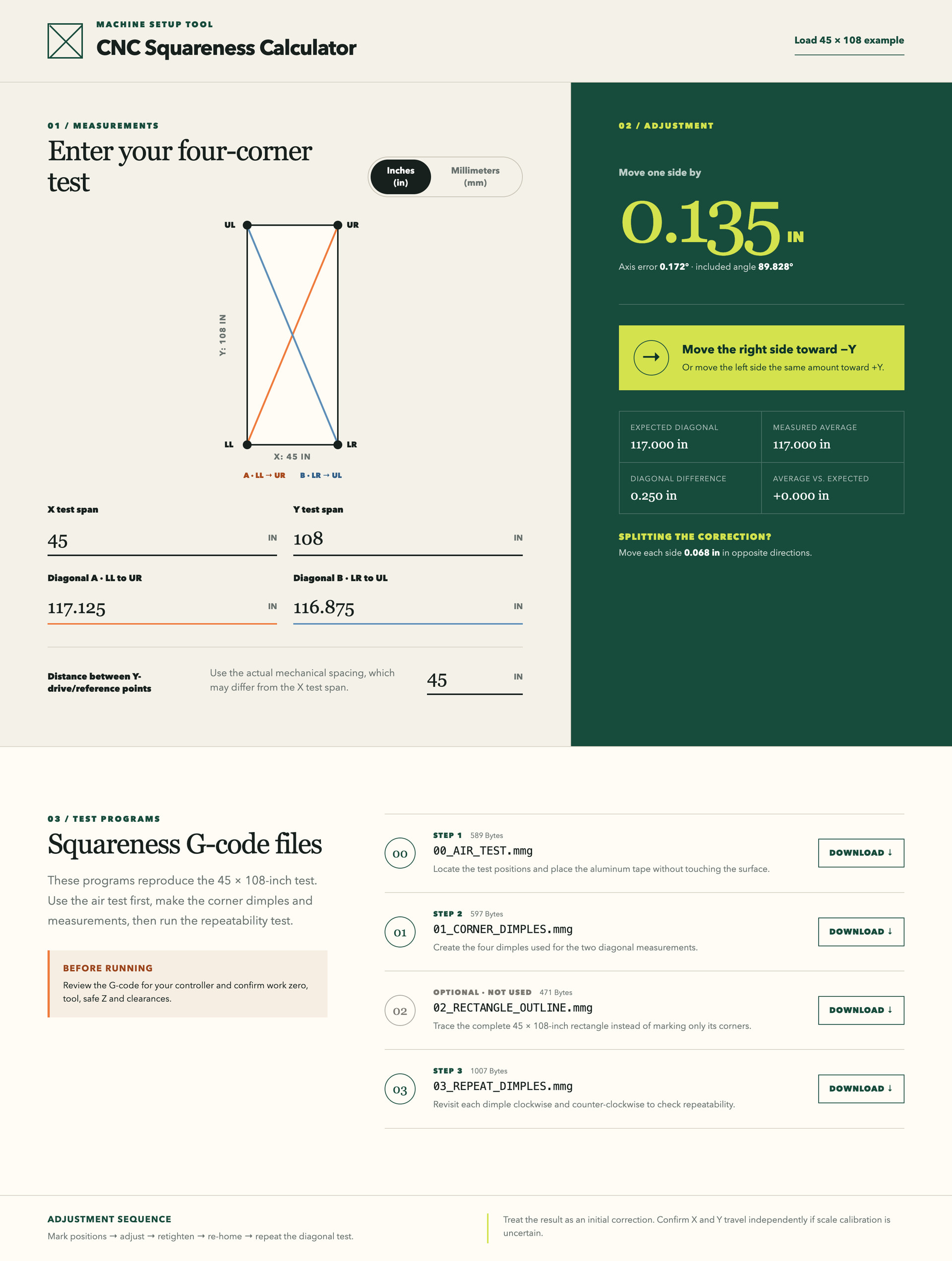
See CNC Squareness Calculator on my website. The crucial thing is that after filling in the left with diagonal measurements it tells you on the right how much to adjust Y and in what direction.
Nice. Will be interesting tonight to first try loosening right side and aligning with the left / right physical stops to see how close it gets to square. If this works, that will keep us from chasing measurements and introducing measurement error. If the stops have not been damaged, that may be our best shot at true-ing it up. That would also support the “pull-gantry” method in the future if it gets slightly misaligned.
I would bet that repeated “crashes” is the culprit to getting its squareness out of whack. If that is the case, then perhaps we should require a problem report to be submitted when we have crashes, and to check if All Axis Home returns to both stops prior to commencing next operation.
Eric (@niccumec) and I got together yesterday to resquare the large CNC. Our first task was to verify the squareness of the CNC. While doing this James (@jamesfreeman) arrived to assist too. What we found surprised us. I was expecting to find that the CNC was as I measured it 11 days ago (see first post) - about 1/8" diagonal unsquare. Instead we found that the unit was very close to square - about 1mm diagonal unsquare. The CNC Squareness Calculator said that we only needed to adjust the Y axis 0.1 mm! That is, very much within tolerance. As a result we left it as-is, packed up and called it quits. So what happened? Reading back through this posting we found @EricP said “I adjusted it a bit last night” and we surmised that he indeed had resquared the large CNC within tolerance. Thank you Eric. P.S. We measured the puck with calipers to be between 14.6 mm and 14.7 mm - we checked the internal controller setting is 14.67 mm. So we left it as-is too.