The recent ASMBLY Work desks have a nifty measuring rulers etched into the top of them, I was wondering which of our lasers etched these rulers, and what were the laser intensity (percent or wattage) and movement speed. I want to do some etching on my 2x2 project and would like to have the same look as that of our ASMBLY work desks,
1 Like
I believe they were done on Tarkin, but I dont know the settings. Even so, I believe both Tarkin and Dorian have had repairs done that have up’d the power of the machines. I always recommend test trials.
1 Like
James, I agree. I was wondering if anyone kept records of the settings so later we could reproduce them - if and when we need to.
@DirtHurt is working on making a keychain of settings to keep at the computers. I also saw this neat sign at MakeATX I wouldn’t mind making our own version
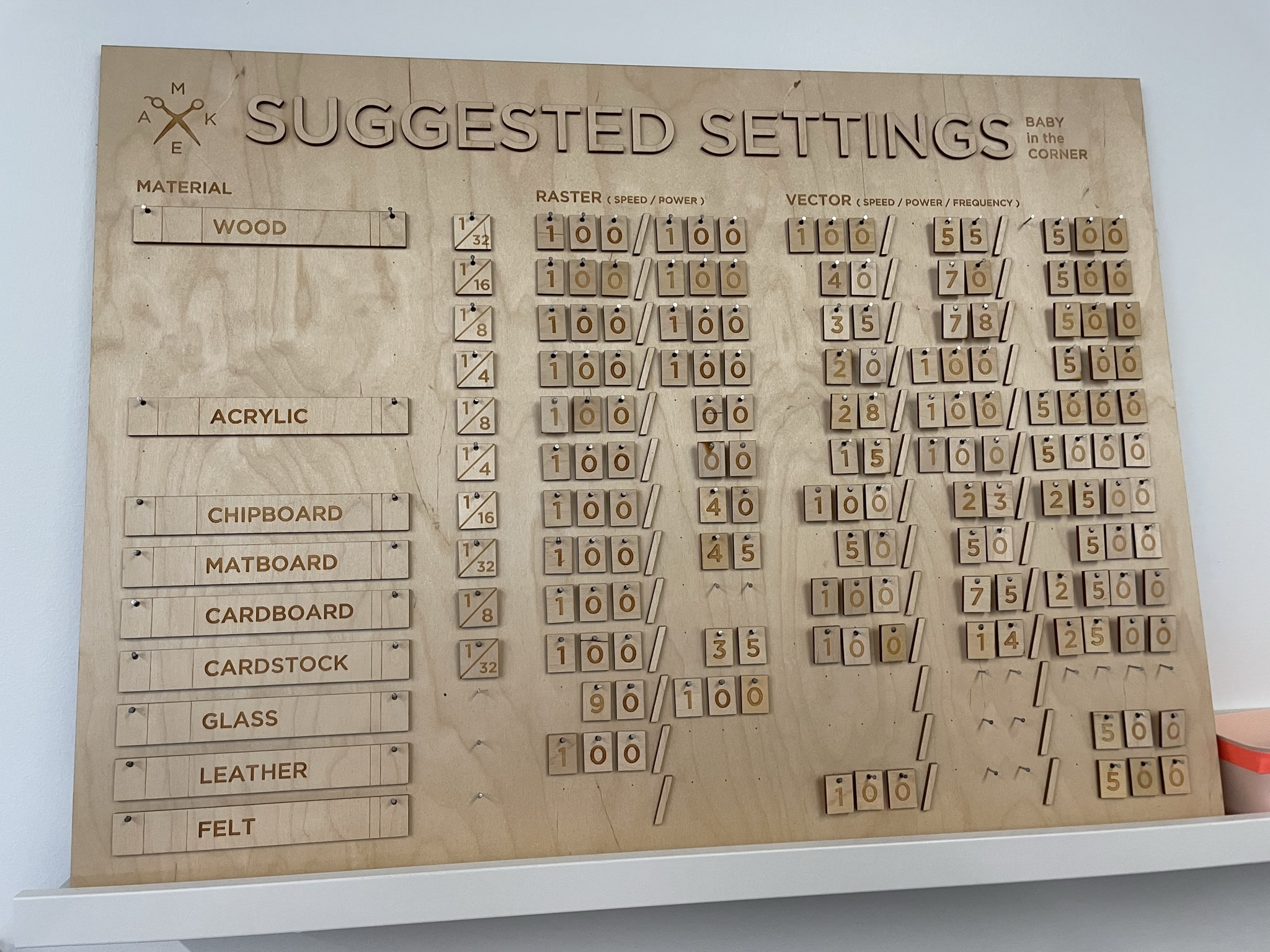
4 Likes
OooOooooOoOOooooo I dig that!
But also yes, time permitting I’m planning on making some test grid swatches of a bunch of materials for rastering and cutting on Dorian.
Each pair takes about an hour so I’m piecemealing the ones I have time for inbetween other stuff
3 Likes
@valerie and @mark999 worked on those tables. They were doing them at a time when Tarkin was having some chiller issues, so their settings might not be what is needed when it is operating normally
1 Like
I don’t remember the settings + what @stepho said on whether they’re still accurate, but everything – including the Lightburn files – is in this folder on the Asmbly Shared drive OPEN - Projects folder – Lasered Standing Desks - Google Drive
On rastering, do not neglect line interval. If you halve the line interval, it will burn twice as deep for the same speed and power. You must take into account speed and power and line interval equally. Setting line intervals >70% of the beam’s focal spot size can yield different aesthetics too, it’s not just about burn.
Most of the time, though, if your line interval isn’t large, the appearance in deep cuts like that is just the depth, and it’s just the power / speed. So generally I’d recommend leaving power at 100% and just tinker with speed and line interval on depth cuts. On lighter engraving, % power
They’re different machines. Dorian is HVDC-excited, Tarkin is RF-excited. Pearl and Blue are also RF-excited.
A couple of inherent differences is HVDC-excited has no low end. Somewhere below ~20%, the beam will just go unstable and stop lasing. So, a range of low intensities are not possible to generate. This probably won’t be an issue for you because you’ll be running at probably full power. This % changes a lot with lower PWM freq which is selectable in Lightburn, but that response is somewhat complex.
The other is HVDC has a much slower response time, on the order of 1ms to turn the beam on and 1ms for it to turn off, and a gradient of power in between. So, if you’re doing fine engraving, somewhere over about 60mm/s it’s possible the beam won’t turn on and off fast enough and it can just smear, and even when it’s not fine engraving, this can affect how sharp of an edge you get when moving horizontally quickly. But, you’re probably not going to notice on this deep-wood engraving.
The low-end performance and on/off times on HVDC-excited tubes do vary widely as they age, so it may not respond to a preset setting consistently in this range.
RF-excited Tarkin has very sharp turn on/off times, about 100x faster, and will successfully modulate power down to fractions of a percent.
Overall, Tarkin is substantially more wattage than Dorian.
Thanks Danny. I always wondered why Dorian would stop lasing, and now I know that it’s “HVDC-excited and has no low end”.
I didn’t get anything to happen sub 20% so that’s been my floor for all the tests I’ve been doing
Thanks for the info @dannym. I’ve seen the advantage in using Tarkin at low power. I’ve got some 0.025" heat pressed epoxy card stock I’m trying to cut with fine detail to make a diorama.
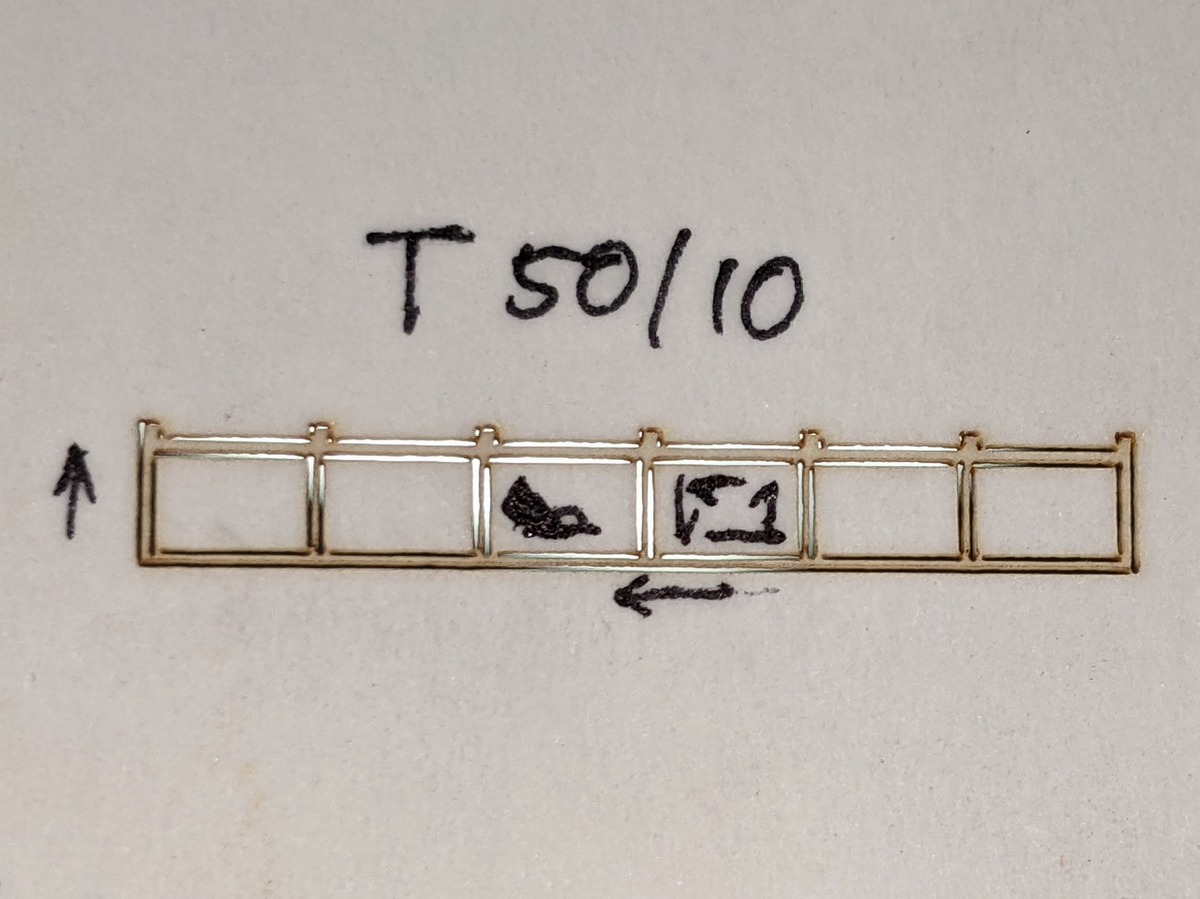
The rectangles are 1/4" on the long side, 50mm/s @ 10% power using Tarkin. Is there something I can do that would make the cuts cleaner? I thought I marked things accurately but I’m not 100% certain about the direction the laser was traveling. If I were to setup a small desktop laser to cut my pieces with the required accuracy would a diode laser do a better job?
And an HVDC-excited not having a low end will create a problem which has no good solution if you’re trying to etch a fairly thin material and it has a corner or small-radius curve.
The mechanical gantry of course has to decelerate and accelerate, and the controller (Ruida) manages that. It not only steps the motors slower for corners, tight curvers, and start/stops, but when it’s operating at less than the requested speed, it will try to scale back the power to get the same depth of burn per mm.
Since HVDC-excited loses its output entirely somewhere below around 20%, then it’s not possible to get the requested amount of burn here. The two outcomes are letting the beam extinguish as it slows around the corner, or let the beam run at a minimum of 20% as it corners. Since the carriage has a point where it must come to a full stop in a corner, then it will be very overpowered at the stop point and punch through instead of engraving, and overburned for a few mm before and after the stop corner because the actual speed was less than 20% of the requested speed.
That is what “min power” is. When cutting squares at 50mm/s 100% power, it will be a 100% duty command on the tube while actually at 50mm/s. If min power is 0%, then the controller will command the tube with <20% duty and the beam will extinguish where the actual head speed falls below 10mm/s. So the corners are unburned.
If min power is instead set to 20%, then the beam will stay on through the corners, but the areas where the head velocity falls below 10mm/s will be overburned.
While the RF-excitation in Tarkin can go down very low, the Ruida controller’s handling is a bit wonky in the corners and in some cases can create new problems like this. I’d recommend a very small min power to keep it cutting on the corners.
OK actually I think that’s something specific.
Ruida controllers have a minimum “start speed” parameter. When commanded to cut at 50mm/s, it’s still going to be at 0 velocity a some point for starts, stops, and corners.
Start Speed is a strange number in that below it, it no longer scales but uses Min Power.
If Min Power is set to 0%, then it will not fire below Start Speed.
I believe Start Speed is 5mm/s on Tarkin.
I still am not sure why this setting even exists, but I’m thinking it should be set to zero on Tarkin if the settings will allow it.
Ok cool. All very good information. I’ll try some things and see how it goes. Is it possible (maybe with modified g-code) to fire the laser for a brief period while at zero velocity, say in a corner position and then start the movement again? (Stop, pulse laser, then resume normal movement and cut…)
Tarkin’s power is just too great. It’s hard to hold back all those horses. First world maker space problems I know.
1 Like
@beirdo Have you tried this sqme project on Dorian.
Every laser has its pros and cons. Sometimes what doesnt work well on Tarkin works great on Dorian.
Having multiple options available is a great benefit of the makerspace.
I have. Dorian has no low end due to it’s tube excitation being high voltage DC. Maybe I could try one of the other two lasers using RF but then I’d have to remember how to use Corel again. Back in the day at the ATX Hackerspace my membership usage was 95% Little Blue. I don’t think I even ever used Big Red before we had to put her down.
Pearl and Blue use Corel or Adobe Illustrator, the laser just uses a print driver.
Both Tarkin and Dorian use Lightburn. You can use Corel, Illustrator, or any tool to create your work, but it’s not required to do design in, you can do your design in Lightburn but TBH Lightburn is pretty weak on its design capabilities.
Tarkin and Dorian do required you to send the job from Lightburn. If you’re not designing in LB, you will import the design you made in the other tool. However it can’t import Corel’s proprietary format, you’ll need to save as svg/dxf/pdf while in Corel.