My plan for this Tuesday is to walk through setting up a Home Assistant Green from scratch, adding the ZWave JS integration, adding our ZWave light switch on the demo wall that we installed last month, and configuring a simple dashboard. A dashboard with one switch isn’t very interesting, so I will also share what my own Home Assistant dashboard looks like, and how I organized it. The main point here is show folks how to go from nothing to something in one hour. There should be plenty of time for questions and to play around with making the dashboard more interesting. I’d also like to go over backing up and restoring your Home Assistant configuration, so it can always feel safe to try out ideas, and know for sure you can reliably get back to whatever you had working before in just a few minutes.
See y’all there! For anyone who can’t attend in person, here’s the forever link for the zoom meeting:
Thank you for putting this plan together!
I will be particularly interested in ways to back up HA safely and reliably
I’m very new to Asmbly and this will be my first Home Tinkering meeting, so I’m excited to listen and learn from what others are building.
Here is my setup in case anyone is interested:
HA running on a RPI 4B with a chunky heatsink so I don’t need fans or anything noisy
I have a mix of different lightbulbs from TP link and other brands
A couple LED drivers to control long strips of warm LEDs in my lab and livingroom
ESP Home with a few ESP8266 12F (on Wemos D1 mini knockoffs) and custom electronics
4 uC with DHT-22 distributed in multiple rooms (I should probably make custom PCBs for these guys
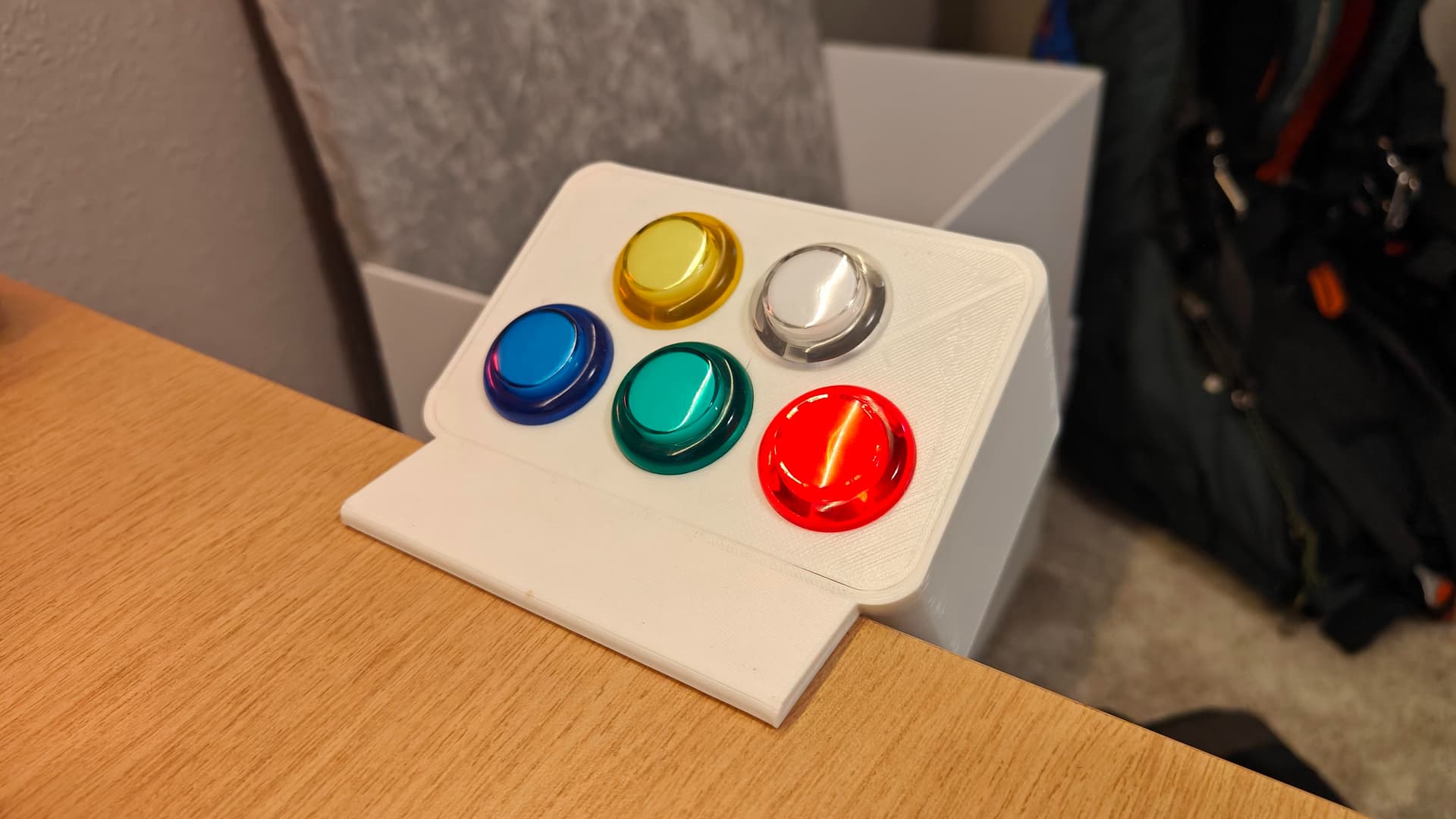
1 with a custom arcade style panel with 5 buttons to control few automations from my lab table
A couple custom devices called Event Counter that still need to be integrated in HA and serve as habit trackers to see when we run the dishwasher and refill our water bottles.
Another custom device called LaserCat that served to keep our foster kittens entertained. We don’t have kittens right now, but LaserCat remains connected to HA because It’s still entertaining for me
Our Phones run HA’s native app so lights go off when we leave and so on.
A bunch of RFID tags in different places to control lights and scenes (putting one on the TV remote was to turn on the Chill mode was surprisingly useful)
A TP-Link camera with Pet alarm so some dimmed lights remain on if we left but the dogs are still in the house at night.
I am currently setting up a new server with the full voice pipeline so we can replace and retire all our Alexas in the house in favor of a more capable and local system. This is obviously a major task since it implies setting up a whole new computer with a good GPU, proxmox and dedicated VMs to run LLM and the voice pipeline… if everything goes well I might have it up and running by Tuesday
Building a few Wyoming satellite speakers will be the next step.
I am currently debating if I should move my isolated HA instance into a new VM in my Proxmox, but I think I like the actual isolation and it doesn’t look like HA is starving for more power.
Anyhow, I’m eager to learn from what you guys are doing and give a hand in case there is anything I can do to help
Sounds like you’ve got quite the setup @Angel! Is The Home Lab you? LaserCat looks quite entertaining for all species
I have a conflict this month and have to miss, but I’ll be looking forward to hearing about the configuration you did so your lights go off when y’all leave. @torchedguitar and I have talked about doing things like that for ours, but we haven’t dabble in that yet. I just made changes to our dashboard homepage to add a couple scenes for everyday actions with multiple entities. I’m excited to have that more streamlined, but it’ll be a lot cooler when we get it to make things happen automatically based on phone location (especially multiple phone locations).
That is me! The Home Lab is my way to force myself to document and stay a bit organized but there is still a lot of work to do there
Scenes make things a lot easier and let you replicate behaviors with different triggers in a very clean way. Turning the lights off when nobody is home is the most useful automation we have in the house because we don’t even think about it anymore… but it also is the easiest one to do once you have HA on your cellphones.
Too bad we’ll miss each other on Tuesday, but I’ll start being around more often in February once I sign up as a member
Oh I’m going to dig into your site for sure, Angel!
I was hoping to make it today, but I’ve got a kid home sick. Might be able to pop in on zoom during bedtime, but I’m not counting on it. I currently have a ton of Zwave switches and outlets, smartthings hub, and google home to run it all. Definitely interested in switching to HA in the near future! What are the main benefits yall see over GH?
hmmm… that’s a good question.
For me it’s a mix of “My house, my rules” and “I can make that cheaper/faster/custom”.
My house, My rules: GH, alexa and whatever other system forces you to live in their ecosystem and they impose the rules, so you can’t expect to be able to control everything you want, and may end up with multiple apps controlling those things GH is not willing to talk to.
This also limits your ability to build your own devices, for example, but I understand that may not be for everyone.
Home Tinkering: Well… I guess most of us here play around with electronics and have plenty of ideas for devices that may not exist in the market or… if they do, they have astronomical prices. In my case, I have a bunch of ESPs controlling multiple things in the house, RFID tags and cellphone integrations that make the house fell alive.
Just as an example, here is my arcade control panel that simply clamps on to my table in the lab. This is a simple Wemos D1 mini with ESPhome using all its IOs to trigger scenes and automations. I don’t even know if it would be possible to use ESP home with GH or Alexa, so you would be missing on a huge universe full of amazing rabbit holes to make your own little devices for just a few dollars (that control panel was probably $10 all included)
More goodies: As an extra point. Now that I have spent the whole weekend building the new server with a proper local LLM, not only I have a voice assistant that does STT and TTS faster than real time (just like Alexa, really) but I can also say things like “remind me to water the plants when I get home” and because HA already has my location from my cellphone, it simply creates a todo that sends a notification to my cell when I arrive… I’m sure this is possible with GH and Alexa, but how cool is it to do it without the need to give away your data!!!
Anyway, GH and Alexa are great and reliable systems, but HA is soooooo satisfying once you have it all running
@mewpal Hopefully you can call into the zoom meeting and see some of the HA setup process – it’s really simple to get from nothing to something. Just gets a bit more involved once you learn how customizable it all is, and start going down the rabbit hole of making nicely organized dashboards with well-named devices.
About HA vs. Google Home or Alexa, I agree with @Angel. I’ll say even louder that the single most important thing about HA is local hosting. The two benefits of having all my home automation stuff on-site that matter most to me are (1) no dependence on a reliable internet connection and (2) no one outside my walls gets access to any of my data. (1) is especially important if your internet connection is spotty, but it also helps for speed… cloud-based speech recognition or camera object detection generally can’t respond instantly, because it has to upload the recorded audio or video to a server to process. Now that most CPUs have AI co-processors to help with the heavy-lifting there, it’s getting a lot more reasonable to do speech recognition, face detection, package-on-the-doorstep detection, etc. all with your own hardware. And that means your system can react to it more quickly, which is really satisfying once it works. And (2) is a personal preference thing, but after working in software for 20 years and seeing how bad most of it is, I just don’t like the idea of microphones and cameras all over my house unless their streams get processed on-site, by code I wrote (or can at least read), and then the recordings are promptly discarded. HA has a lot of other nice things too, which I’m still learning about!
Just did! In my typical timely fashion, haha. It was a little trickier because Notion doesn’t have speech-to-text transcription capabilities for uploaded audio files like it does for live meeting recordings, but I was able to give it Zoom’s transcript and that worked well enough.