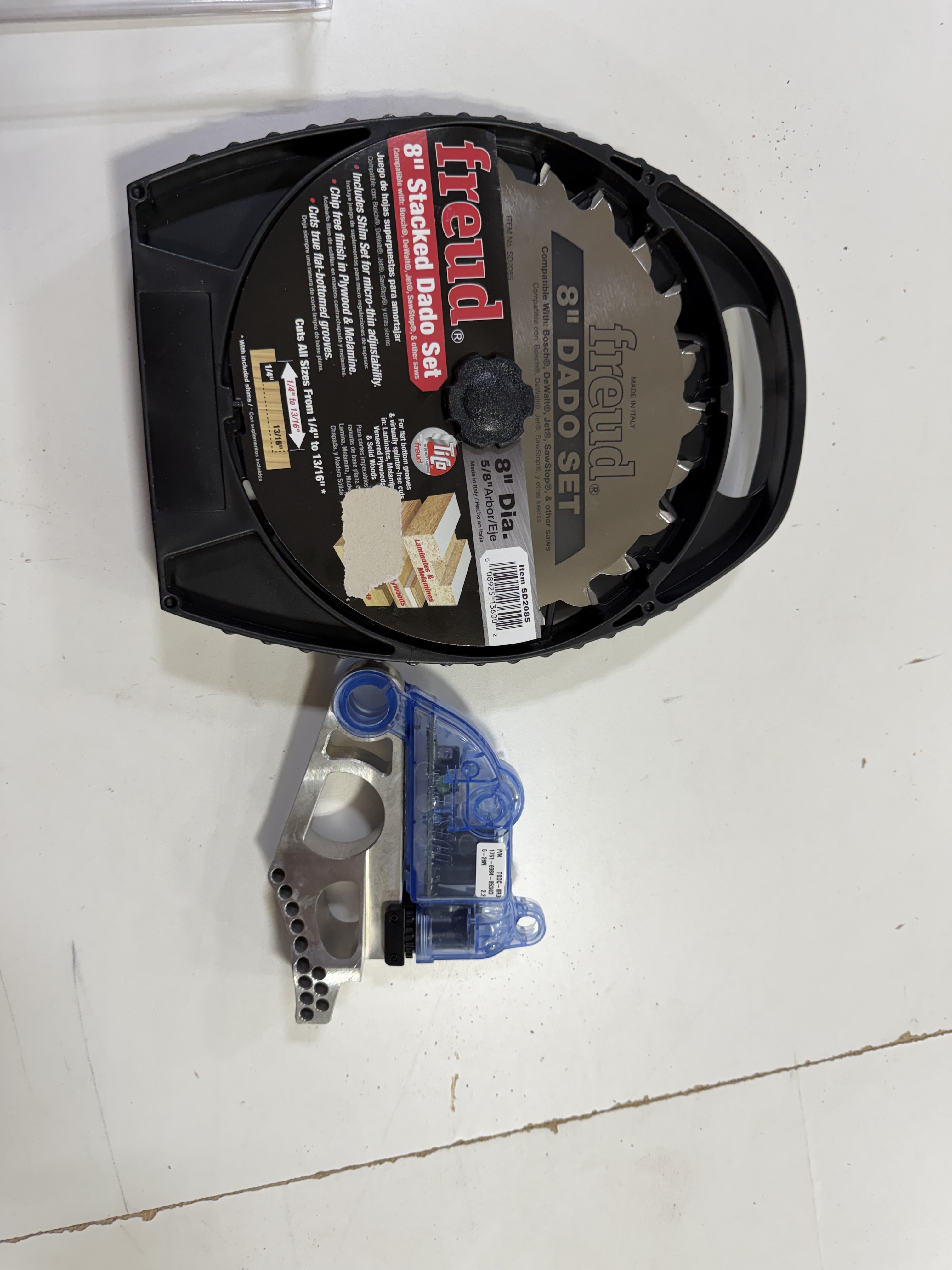
Problem Type: Equipment
Workspace: Woodshop
Asset: Table Saw 2 - Sawstop
Summary: Threw break cartridge on table saw 2
Additional Info: Not sure how (no flashing codes and no material had been fed yet). I attempted to remove the dado and cartridge, but it wasn’t coming out easily and I didn’t want to force it further and do any damage). Unfortunately, it’s all still in there. Sorry, y’all. I can come help remove it (with some guidance). let me know what I owe for the cartridge and dado.
Report generated from a filing. This report has also been sent to Asmbly staff, leadership, and space leads with any contact info that was provided. Provide additional photos or resources here to help. When the problem is resolved, ensure it is marked.
If you can provide more information to help you going forward. Did the activation happened upon you turning the power on? Or you turned power on and then turned it back off and maybe activated the cartridge during the coast down period? If you did not know, the safety part stays on all the while the blade is moving. The reason I’m asking is that two things could have happened, when the cartridge is activated during coast down, the blade does not dig too deep into the aluminum brake. In the process of removing the cartridge, i was able to separate the blade from the cartridge. So that’s one part. The second part is that once I got to the cartridge it appeared to be installed incorrectly but if this was the case, you should not have been able to turn the power on. Im sorry that you had this experience. The normal process is to go to Neon, click on dashboard, then Asmbly on line store, and find the cartridge and the blade towards the bottom. In your case, you activated a dado cartridge so probably it will be easier and cheaper to purchase the cartridge and dado set on your own and return them to Asmbly. The cartridge is the blue color (I think that’s the only one they sell now days anyway) and the Dado set is the Freud brand and more than likely is the only kind you’re going to find on the shelf at the store. Woodcraft or Rockler should have both. Even though I was able to separate the blades, the carbide teeth that when into the brake have been compromised and the set has to be disposed as those teeth may dislodge during operation, and go flying with the possibility of hurting people around. Anyway, please get with a shop steward or myself to make sure you’re installing the cartridge correctly so you don’t have this experience again. I have been around Sawstop pretty much since it came into the market and you are the first person in all those years that has activated a dado cartridge that i know. Please be safe!
i initially installed the Dado and didn’t switch the cartridge. The saw gave me the error code “adjust position of break cartridge.” I then realized I hadn’t installed the dado cartridge and made the switch. I checked that the blades moved freely. I replaced the throat plate and confirmed it also had clearance. The error code resolved after I powered back on and I got solid green indicator for at least 10 seconds. I then attempted to turn on the saw at which point the break fired. It was very quiet and seemed to drop much more slowly than I’d always assumed it would (slow enough that I had time to recognized that it was dropping in the moment). It didn’t seem like the blade had a chance to start up, either (hence it not being buried in the cartridge).
I’ll bring the new cartridge and dado set today (10/27).
Thank you for the help and I’d appreciate the opportunity to learn how I incorrectly installed the cartridge so I don’t repeat the mistake.
@MikeyD was the riving knife installed when the brake triggered?
Asking because SawStop recommends checking the gap (5-7mm) between that and the blade every time one of those changes out.
They also recommend to check the gap between the brake and the blade any time either one of those changes. That gap should be between 1/ 16 inch and 1/ 8 inch. We keep the yellow plastic gap checker on the side of the table saw.
No, riving knife wasn’t installed and its holder was clamped back down (handle out of the way). I think my error was not using the yellow tool to check the blade/break clearance and assumed that freely moving dado blades was enough.
Well, in my experience, all the indications point metal to metal contact activation. Unless you had the blades below the throat plate and you put your hand on top it is possible that your hand to be close enough for activation without you touching it. If a metal something was loose around the area, when you turned the machine on it came in contact with the mechanism. If the gap was too close the activation would have been immediate the first time you turned it on. If is too far the machine does not come on giving the “no cartridge present fault.” Something metallic touched the system when you turned it on the second time. Measuring tape, wrenches, a loose shim from the dado stack? The way the system works is from the moment you turn on the switch and the blade starts rotating there is an electrical current going thru, the millisecond something conductive touches the blade, arbor, or ribbing knife, it activates. Basically you ground the system. Was the arbor nut tight when you tried to remove the mishap? When I went to look at it half of the stuff was out. No arbor nut, outer blade, the holding locking pin was also not present. It looked like you had the full stack on so you should not have been able to use it with the stabilizer washer (there is no room). There are a lot of missing variables to fully pinpoint a cause. To be honest, I don’t even know why the use of the dado is so prevalent in Asmbly, I have not used one in decades and don’t even consider it as part of my decision making when it comes to joinery. Im glad you did not get hurt though!
We’re going to send the brake to Sawstop for a full analysis. Maybe that will provide some insight. For what it’s worth, their tech support thought an incorrect gap adjustment was the most likely cause based on the description of events.
Hey guys - I actually came to Asmbly about ten minutes after Mike had this incident, no joke - for the exact same purpose. Being an old school cabinet maker, I don’t have ANY CNC training, so to build a strong cabinet box, I was planning to run 3/4” wide x 3/8” deep grooves into my 3/4” plywood parts, to use for rabbeting and grooving the verticals, shelves etc.
I am only building one box around 5ft by 4ft, not an entire kitchen. In this case, I can think of no better way to do this, without of course the CNC, which again I have zero training with.
Mike - thank you for so quickly replacing the cartridge! I plan to use my own dado blades, and really all I need from Asmbly is the beautiful outfeed that the saw stops have.
in my old cabinet shop, we had a sliding tablesaw which is much easier for large panels and repetitive accuracy, but a simple outfeed table is good enough for one project.
any thoughts - I guess router could work but is super messy no my go to for hogging out plywood. Dado is chefs kiss for this. Feedback welcome!
Cut the edge lines of your dado on the table saw. Make multiple passes adjusting the blade about 1/8" each time until you have a messy dado. Use a pattern bit to clean the dado. If the router bit is too long use a straight edge guide board on the edges. Use double sided tape to secure the boards on the edges for the router bit to follow.